Home » RocketPlay Mobile Casino: PWA Installation and Browser Play
RocketPlay Mobile Casino: PWA Installation and Browser Play
Updated November 2026
Licensed
Available in AU
Fast payouts
18+ Only
RocketPlay Australia Guide
Mobile access
RocketPlay’s current mobile route can be opened in the browser or added to the phone’s home screen for faster access.
RocketPlay’s current official mobile instructions focus on a Progressive Web App, or PWA, that can be added to the home screen from Safari on iOS and Chrome on Android. You can also use RocketPlay directly in a mobile browser without adding anything to the home screen. The documented route does not require an APK file or an App Store download.
The practical choice is therefore between opening the casino in the browser and adding the same web experience to the home screen for quicker access. Both routes use the same account rather than creating a separate mobile profile. Before relying on any third-party download page, start with RocketPlay’s own mobile instructions and avoid installing unrelated files.
Current app route
Before installing the progressive web app on iOS or Android, make sure to complete your profile setup via ourRocketPlay sign-up and registration walkthrough. Table of Contents
Progressive Web App Setup, Android Access and iOS Compatibility
RocketPlay’s official PWA page gives separate installation steps for iOS Safari and Android Chrome. On iPhone, the route uses Safari’s Share menu and Add to Home Screen. On Android, RocketPlay instructs users to open Chrome, choose Add to Home Screen and install the shortcut from there. The result behaves more like an app from the home screen while remaining web-based.
This distinction matters because the word “app” can refer to several different things. A native app is distributed as platform software through an app store or direct package. A PWA is a website designed to launch from the home screen with app-like presentation. RocketPlay’s current first-party instructions describe the second model.
If your goal is simply to play on a phone, installation is optional. The RocketPlay games guide covers the main game categories, while the mobile browser gives you the same account entry point without adding a shortcut.
Android
Android setup uses Chrome and Add to Home Screen
On Android, RocketPlay’s current instructions direct users to visit the casino in Chrome, open the browser menu, choose Add to Home Screen and complete the install step in the window that appears. That process creates a home-screen entry without requiring the user to find a package file on another website.
The browser-only route remains useful if you use more than one device, do not want another home-screen icon or prefer to keep gambling sites inside the browser. The home-screen route is mainly about convenience: it reduces the number of taps needed to return to the site and can make the mobile experience feel more focused.
Whichever route you use, keep normal browser and device hygiene in mind. Use the RocketPlay address you intend to visit, keep the browser updated and do not sideload an APK merely because a third-party page labels it as official. The current RocketPlay PWA instructions do not require that step.
iPhone and iPad
iOS uses Safari’s home-screen shortcut rather than a separate account
For iOS, RocketPlay tells users to open the site in Safari, tap Share, choose Add to Home Screen and then use the new icon for quick access. The shortcut opens the web experience tied to the same RocketPlay account you would use in Safari normally.
This makes the decision similar to Android: you can stay in the browser or add a home-screen entry. The official PWA instructions are the clearest current route for iPhone access. They do not require you to create a second account, move your balance or maintain a separate mobile wallet.
If you see a similarly named app in an app store, check the developer and destination carefully rather than assuming it belongs to the casino. Brand names can overlap with unrelated software. The safer starting point is the RocketPlay website and its own mobile access instructions.
PWA vs browser
Both routes solve the same task, but the trade-offs are different
Area
Home-screen PWA
Mobile browser
Setup
Requires a short Add to Home Screen step.
No setup beyond opening the site.
Return access
Launches from a dedicated home-screen icon.
Use a bookmark, history or typed address.
Updates
The web content is delivered through the site rather than a manually downloaded APK.
The browser loads the current site each time you visit.
Account continuity
Uses the same RocketPlay account credentials.
Uses the same RocketPlay account credentials.
Best fit
Frequent mobile users who want a dedicated icon.
Occasional users or anyone who wants no installation step.
There is no need to choose permanently. You can use the browser first and add the PWA later if you find yourself returning often. Removing a home-screen shortcut also does not close the underlying casino account.
Games on a phone
Mobile access is more useful when the game lobby stays easy to navigate
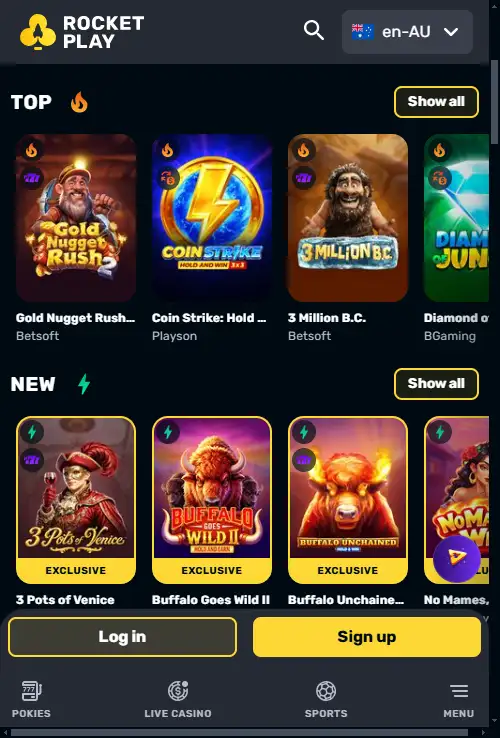
RocketPlay supports mobile-browser play, so the main game categories can be reached from a phone without a separate native install. On a smaller screen, the practical difference comes from navigation: search, category filters and provider browsing matter more than a large desktop layout because fewer tiles fit on screen at once.
For live casino play, screen size and connection stability become more noticeable. A phone can be convenient for a quick session, while a larger display may make multi-panel live interfaces and table information easier to read. For pokies, portrait use can be comfortable for browsing, but individual games may switch orientation or use their own controls.
Game availability can also vary by territory and provider. Mobile access does not mean that every title is available in Australia; use the mobile games guide to compare the available categories separately.
Account and cashier
Your mobile route does not change the underlying account requirements
Using a PWA or browser does not create a special mobile account. Registration, login details, identity checks and payment ownership rules still belong to the same RocketPlay profile. If you begin registration on one device and later continue on another, use the same account rather than creating a duplicate profile.
The mobile cashier should also be treated the same way as the desktop cashier: check the methods and limits displayed for the account at the time of the transaction. A home-screen shortcut changes how you launch RocketPlay, not the rules attached to deposits, withdrawals or verification.
The account guide explains registration, login and verification structure in more depth. It is useful reading before you depend on a phone as your main way to manage the account.
Official setup reference
Use RocketPlay’s own PWA instructions when adding it to a phone
RocketPlay’s official PWA page provides the current Add to Home Screen steps for Safari on iOS and Chrome on Android. That makes it the sensible reference point when the mobile setup changes, because third-party guides can continue circulating older APK or store claims after the brand has changed its preferred route.
If the instructions on your device differ from older advice, follow the current first-party flow rather than forcing an installation method that the site no longer presents. Browser menus also change over time, so labels can vary slightly between operating-system and browser versions.
Route comparison
Choose the PWA for a home-screen entry point, not for a different account
The documented PWA route and ordinary mobile-browser route lead into the same RocketPlay account experience, so the choice is mainly about access habits. Adding the PWA places a home-screen entry point on the phone; using the browser avoids that setup step. Neither current route requires an APK or a separate app-store installation. That distinction is useful when older download instructions appear elsewhere: the current first-party setup should take priority.
For day-to-day use, compare how each route behaves with your own browser settings. Check whether sign-in remains convenient, whether the game lobby and cashier are easy to reach, and whether the interface remains readable after changing orientation. If a browser clears site data or blocks saved sessions, that can affect login continuity regardless of the home-screen shortcut. The practical test is therefore the device you actually plan to use, not a claim that one route is universally better.
Which route fits you
Choosing between RocketPlay’s PWA and mobile browser
For occasional use, the mobile browser is the simplest route: open the site, sign in and play without adding anything. If you use RocketPlay regularly on the same phone, the PWA offers quicker home-screen access while keeping the experience web-based. The current official instructions support both iOS and Android through the browser’s Add to Home Screen feature.
The most important distinction is that convenience should not push you toward an unverified download. Start from RocketPlay’s own site, use the documented PWA or browser route, and keep the same account credentials across devices. For the broader Australian context, return to the RocketPlay Australia review.
Experience mobile-optimized gameplay and fast payouts atRocketPlay Casino Australia.
RocketPlay Casino Games: Online Pokies and Live Dealer Tables

 Available in AU