Home » RocketPlay Account Guide: Registration, Login and Profile Setup
RocketPlay Account Guide: Registration, Login and Profile Setup
Updated November 2026
Licensed
Available in AU
Fast payouts
18+ Only
RocketPlay Australia Guide
Account journey
The account journey starts with the current options shown on RocketPlay’s Australian-facing site.
RocketPlay has an Australian-English version with separate Log in and Sign up entry points, and AUD is supported as an account currency. The practical account journey is straightforward: create one account with accurate details, confirm the options actually shown during signup, keep your login details secure, and expect identity verification to become part of the account lifecycle.
The important distinction is that account access, currency choice and regulatory status are different questions. Being able to reach a signup form does not itself establish Australian regulatory authorisation. Use the account area for account decisions, and treat licensing as a separate issue.
Account Registration Process, Data Accuracy and Security Rules
RocketPlay’s terms allow one account per player and require account details to be kept current. That makes the first setup more important than it can look. Use your own contact information, avoid duplicate registrations and make sure the details you submit are information you can later support if verification is requested.
For Australian users, AUD support is useful because it keeps the account balance in a familiar currency. If a currency choice is presented during registration, confirm that it matches the currency you want before submitting. Do the same for country or region details: use the selection actually shown by the form and enter your real residence rather than assuming a field will be prefilled correctly.
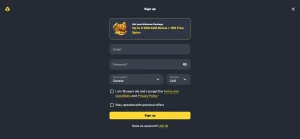
The current Australian-facing RocketPlay page provides Sign up and Log in controls. For a focused walkthrough of the signup stage, use the registration steps.
Registration versus account use
What changes after the signup form is submitted
RocketPlay’s current Australian page describes registration as entering personal details through Sign up and then verifying the email address before moving on to funding. The registration form itself can change, so the useful rule is to follow the fields you can actually see rather than relying on an old list of form inputs.
After registration, the account becomes the centre for balance information, promotions, payments and identity checks. These parts are related but should not be treated as one step. A bonus is optional, a deposit has its own payment conditions, and KYC has a separate purpose. Separating those decisions makes it easier to see what you are agreeing to at each stage.
Stage
Main task
What to check
Sign up
Create the account with accurate details
Contact details, residence fields and currency options shown on the live form
Email confirmation
Confirm the address attached to the account
That you can still access the email account used at signup
Login
Return to the existing account
Correct credentials and the official RocketPlay site
Funding
Choose a payment route
Current cashier method, currency, limits and ownership requirements
KYC
Verify identity when required
Requests shown in the account and the current document requirements
Login habits
Use the existing account instead of creating a second one
The simplest login rule is to return through RocketPlay’s official site and use the account you already created. Because the terms allow only one account, a login problem is not a good reason to start a second registration. First check the email address or username you used, the password you intended to save and whether you are on the official site.
If access still fails, use the recovery option shown on the current login screen where available, or contact support. RocketPlay lists 24/7 live chat and a support email address, which gives you an account-recovery route without creating duplicate credentials.
On a shared device, avoid saving login information in a browser profile that other people can access. On your own phone, the mobile access page explains the current browser and home-screen routes without requiring a separate account.
Verification
KYC is part of the account lifecycle, not an optional extra
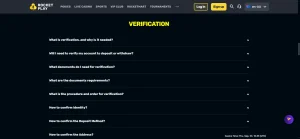
RocketPlay’s current terms make KYC mandatory. The point at which a user is asked to complete checks can depend on the account situation, so it is more useful to prepare for verification than to assume it will happen at one fixed moment. Accurate signup details matter because identity, address and payment information can later need to line up with the account.
Document checks are covered in the KYC requirements guide, including what to check before sending documents and why payment ownership matters.
A practical account rule follows from this: do not wait until a withdrawal request to notice that your name, contact details or residence information are wrong. Correct account information early, and use support if the interface does not let you update something that matters.
Keep details aligned
Review account information before the first deposit or withdrawal
An account can be created before every later decision has been made, but the information attached to it should stay coherent. Before funding, check that your account details still match the name and contact information you intend to use. If a residence detail has changed or an email address is no longer accessible, deal with that before adding another layer of payment or verification activity.
Payment ownership matters as well. RocketPlay’s terms prohibit third-party payment systems, so the account holder and the person controlling the payment route should not be treated as interchangeable. You do not need to memorise every cashier rule at registration, but you should avoid setting up an account under one person’s details and then trying to fund or verify it through another person’s credentials.
Bonus choice is another separate account setting. RocketPlay allows deposits without activating a bonus. If a promotion is offered during signup or after login, decide whether its conditions suit you before opting in. That keeps the account setup focused on identity and access instead of making a promotional choice feel compulsory.
These checks also make future support conversations easier. When the account name, email, residence information and payment ownership are consistent, there are fewer moving parts to resolve if a verification request or login problem appears later.
It is worth doing the review again after a long period away from the account. A saved password may still work while an old email address, changed residence or expired identity document creates friction elsewhere. Logging in successfully answers only the access question. It does not confirm that every stored account detail is still suitable for payments or verification, so keep those records current before they become time-sensitive.
Australian context
Account access and Australian regulatory approval are separate
RocketPlay operates an Australian-English site and supports AUD, but those product choices should not be confused with a local regulatory licence. Registration tells you that an account path is being presented; it does not answer the separate question of which regulator licenses the operator or what Australian law says about online casino services.
That distinction is useful when reading casino marketing. A local-language page, local currency and familiar payment terminology describe the user experience. They are not substitutes for licence information or regulatory context.
For the broad product picture – games, bonuses, payments and the regulatory section – return to the RocketPlay Australia review.
Lifecycle check
Treat signup, access, funding and verification as one account record
The account becomes easier to manage when the same core details carry through every stage. Registration establishes the profile, later logins return to that profile, payments add ownership information, and KYC checks whether the identity, address and payment evidence are consistent with the account. Reviewing those details before the first deposit is more useful than waiting for a withdrawal request to expose a mismatch.
This does not mean every stage happens at the same time. KYC is mandatory under RocketPlay’s terms, while the exact point at which documents are requested can depend on the account. The practical preparation is to use accurate information from the start, keep access to the registered contact details and follow the dedicated verification requirements when they are requested.
Account readiness
From signup to verified RocketPlay account in Australia
The strongest account setup is the least complicated one: one account, accurate details, a reachable email address and a deliberate AUD choice when that option is shown. Use the current form rather than an old field list, keep login recovery tied to the existing account, and treat KYC as a normal part of the lifecycle rather than a surprise at cash-out time.
That approach also keeps separate decisions separate. Registration, bonus activation, payments and verification can affect one another, but none should be assumed from the completion of another step.
RocketPlay Account Guide: Registration, Login and Profile Setup

 Available in AU