RocketPlay Casino Registration and Sign-Up Guide for Australians
Updated November 2026
Licensed
Available in AU
Fast payouts
18+ Only
RocketPlay Australia Guide
Sign-up guide
Read the current fields carefully before creating the account, especially residence, currency and contact details.
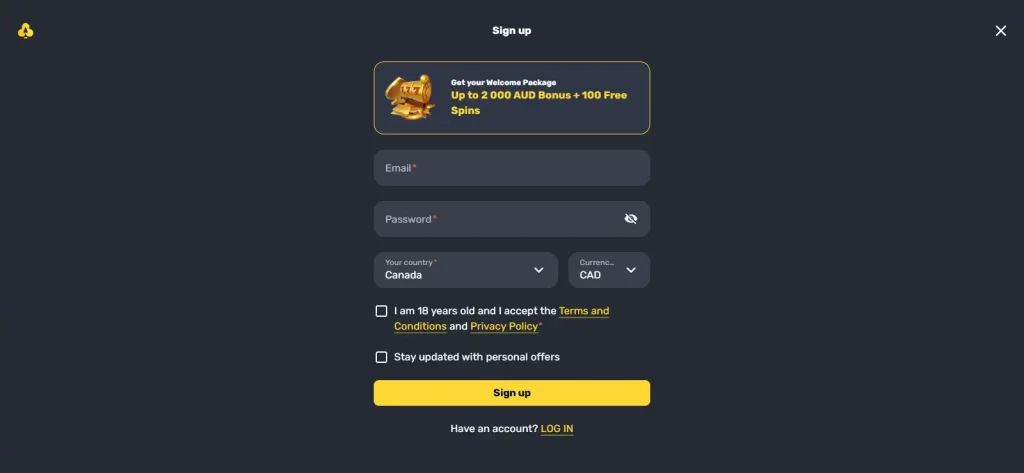
RocketPlay’s Australian-English site currently shows a Sign up entry point and supports AUD. Start there, enter accurate personal and contact details, verify your email, and check every country, region, currency and bonus choice that the live form actually presents before you submit it.
Signup interfaces can change. The safest pre-submit habit is to read the form in front of you, use your real residence details and make sure the account settings you can control match how you intend to use the account.
Australian Sign-Up Procedures, Email Confirmation and AUD Setup
The official Australian-facing RocketPlay page uses the en-AU locale and provides a Sign up control. AUD is also supported as an account currency. Those two facts make it sensible to begin on the Australian-English version rather than following an old registration link from a third-party page.
Have access to the email address you intend to use. RocketPlay’s current registration guidance includes email verification after the initial signup details are submitted. Use personal information that belongs to you and that you can keep consistent later if the account moves into KYC.
If you want the broader account lifecycle rather than just the form, see the account guide.
Registration sequence
A practical step-by-step RocketPlay signup flow
Step
What to do
What to verify before moving on
1
Open RocketPlay’s Australian-English site and select Sign up.
You are on the official site and not a copied registration page.
2
Enter the personal and contact details requested by the current form.
Names, email and other details are accurate and belong to you.
3
Review country, region and currency fields if the form displays them.
Your real residence is selected and AUD is chosen if offered and desired.
4
Review any bonus choice before submission.
You understand whether you are opting into a promotion or proceeding without one.
5
Submit the form and complete the email confirmation step.
The confirmation message belongs to the same email address used at signup.
RocketPlay allows players to deposit without activating a bonus, so signup and promotion choice do not need to be treated as the same decision. If a bonus is offered during registration, read the current terms before opting in rather than choosing it automatically.
Country and currency
Check the live form instead of assuming selector states
RocketPlay supports AUD and runs an Australian-English site, but that does not tell you exactly how every signup field will be rendered at the moment you register. A country selector may be presented differently over time, a currency choice may appear at another stage, or a field may be determined by the account flow.
The right response is simple: use only what the current form shows. If a country or region control appears, select your true residence. If AUD is offered as a selectable account currency and that is the currency you want, confirm it before submission. If a field is not shown, do not invent a value or assume an old guide still matches the interface.
RocketPlay’s current terms do not list Australia in the general restricted-country list. That is an account-access point only, not a statement of Australian regulatory authorisation. If the signup form presents terms for acceptance, read the current wording before agreeing rather than treating the checkbox as a formality.
This distinction matters because registration should describe what you actually enter, not what a previous version of the site once requested.
After submission
Complete email confirmation and return through the same account
RocketPlay’s current Australian page places email verification directly in the signup sequence. Complete that step using the same address you entered during registration, then return through the Log in control rather than starting a second registration if you close the browser or switch devices.
Once you can access the account, review the personal details and currency shown there before making a first deposit. If something important is wrong and cannot be edited, use RocketPlay support rather than trying to create a replacement account. The terms permit one account per player, so correcting the original account is the cleaner route.
This is also a good point to make sure any chosen bonus state is intentional. Registration can be complete without treating a promotion as mandatory, and RocketPlay allows deposits without activating a bonus.
Verification readiness
Register with KYC in mind even if documents are not requested immediately
RocketPlay’s current terms make KYC mandatory. Registration is therefore the right time to make sure the information attached to the account is accurate enough to support later identity checks. A typo in a name, an outdated residence detail or an inaccessible email address can become more important once payments or verification are involved.
The KYC verification guide covers the current document categories and the checks that matter before a withdrawal.
A successful signup should also not be read as a statement about Australian regulatory approval. Registration is an account process; licensing and local regulation are separate questions.
Pre-submit review
Audit the live form field by field before creating the account
Registration is the point where small data-entry choices become part of the account record, so the most useful final check is to review each field against information you can later verify. Use your real identity and residence details, confirm that the email address or other contact detail shown in the form is one you control, and correct spelling errors before submission. The goal is not to anticipate every later KYC request; it is to avoid creating differences between the signup data and the documents you would normally use to prove those details.
Currency deserves its own check. RocketPlay supports AUD as an account currency, so an Australian user should confirm the currency actually shown by the current form before final submission. Do not infer the selected currency from the site’s language or from prices displayed elsewhere. If the form presents a currency choice, read the selected value directly. If the current registration flow handles currency later, follow that live sequence rather than forcing an older walkthrough onto a changed form.
Apply the same rule to country or region fields. The current terms do not place Australia in the general restricted-country list, but that fact is not a substitute for checking the selector shown during signup. Because a live form can change, confirm that your actual country or region is available before continuing. If the required residence choice is not available, stop there instead of entering a different country to continue.
Bonus selection is another field to treat deliberately. If the form offers a welcome promotion or opt-in choice, decide whether you want the promotion before submitting rather than assuming it is part of registration. The bonus page explains the current two-deposit structure, wagering requirement, maximum bonus bet and validity period. Registration itself should remain a clean account step: choose the promotion only after its conditions fit the deposit you actually intend to make.
After submission, keep using the same account record. RocketPlay’s terms permit one account per player, so a login problem, typo or access issue should not be solved by opening a second account. Use the available account-recovery or support route for the existing profile. That approach also keeps later KYC simpler because the identity, contact details, payment ownership and verification documents all point back to one account rather than competing records.
Before moving on to deposits, run one final consistency check: the account name should match the identity document you would normally use, the residence information should be current, the chosen currency should be intentional, and the contact channel should be accessible. These checks add no new requirement beyond the account and KYC rules; they simply reduce avoidable corrections later in the account lifecycle.
Last check
What to verify before creating a RocketPlay account
Before pressing the final signup button, check the details that will be hardest to unwind later: your name, reachable email address, true residence information, intended currency and bonus choice. Use only fields actually shown by the current form, and do not create a second account to solve a login or setup problem.
Once registration is complete, keep the same details consistent through deposits and KYC. For the broader casino overview, return to the RocketPlay Australia review.
RocketPlay Account Guide: Registration, Login and Profile Setup

 Available in AU